This program imports a file that is usually supplied by a specialist meter reader, containing meter readings, dates and charges according to a predefined format. The format can vary from account to account - details can be obtained from the Help Desk.
Once the file has been received, it must be uploaded onto the server, using the FTP facility, into the /usr/elecw directory. Please read the notes on using the FTP facility
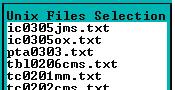
When the program is run, it will display a list of files that have been uploaded, and are available for importing. Select the file that you want to import by entering on it, and then pressing the 'Esc'ape key:
The following selection window will appear:
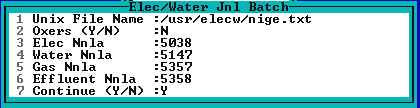
1. The filename will be auto completed based on your selection in the previous screen.
2. File format selection - usually enter 'Y'. Contact he Help desk for more information here. The following flags, contained in the imported file, indicate what type of charge is being raised -
E - Electricity
W - Water
G - Gas
F - Effluent
3 - 6. Select general ledger accounts to which the entries will be posted. The above are defaults that can be changed.
A report with relevant batch numbers and exceptions will be produced. Review the report and take the necessary steps to correct exceptions.
The unposted batches (after any corrections), should be posted using:
Electricity - Unit Electricity Batch screen
Water - Water Batch Screen
Gas - Unit Adjustment Batch
Effluent - Unit Adjustment Batch