This menu item allows the setup or maintenance of a contract or loan debtor. An example of the screen is displayed below:
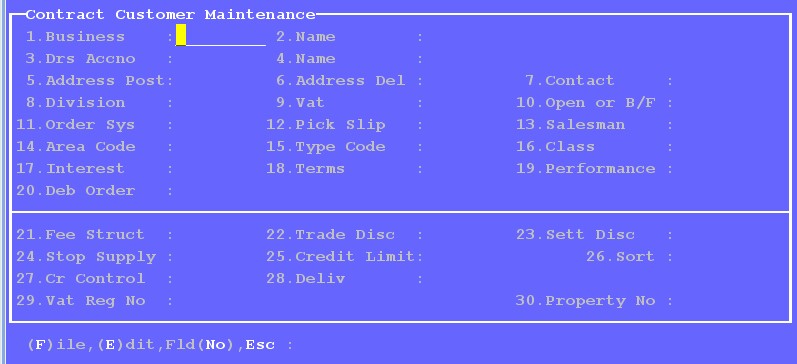
Business - Enter the Business number of Click on 'Select/Drill' (F2) to select off a list.
Drs Acc No - Enter the debtors account number, using an existing number to maintain, or a new number to create a new account. If the number is preface with the word 'LOAN.' , then the debtor will be treated as a Loan debtor. Click on 'Select/Drill' (F2) to search, as seen in the display below:
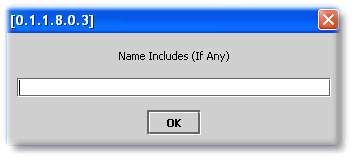
After selecting the debtors account number, the name will be displayed for confirmation.
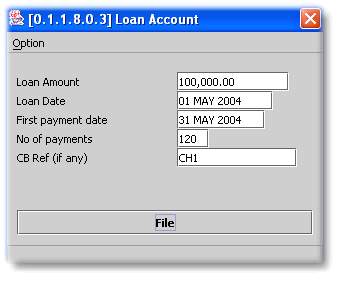
If the debtor is a loan debtor,

Then the initial loan details can be captured in the window that pops up for completion, and example of which is displayed below:
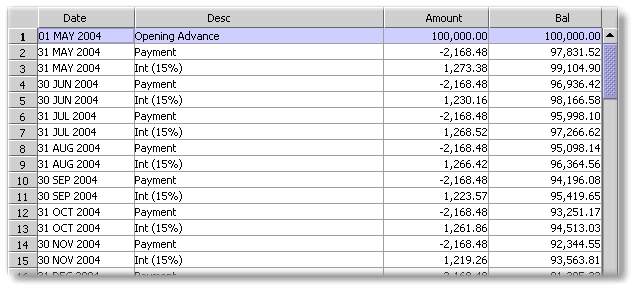
A loan schedule will be displayed, and can be exported, after filing the above information:
Address Post - Click on 'Sub-Enter' (F3) to enter the name and postal address for statements and invoices.
Address Del - Click on 'Sub-Enter' (F3) to enter the delivery address for the supply of services and products.
Contact - Click on 'Sub-Enter' (F3) to enter Contact information for the debtor - Telephone and fax numbers, e-mail address etc.
Division - Enter the division for the debtor as setup in the Setup menu.
VAT - Enter 'Y' if your business is registered for VAT, and the debtor is to be charged VAT. If for an unusual reason sales to this debtor would be exempt from VAT, enter N. This default setting will not be able to be overridden in the invoicing screens.
Open or B/F - Enter 'O/I' for this debtor to be an Open item Debtor, or B/F for it to be a brought forward type debtor. B/F is the only setting available in this section.
Order System and Pick Slip - Can be ignored in the property system environment.
Salesperson - Enter the salesperson that usually manages this debtor, as setup in the Setup menu.
Area code, Type and Class - Can be ignored in the property system environment.
Interest - Relevant to Loan Debtors. Enter the annual interest rate to be charged to the loan debtor on the outstanding balance. The rate can be an actual percentage, or a rate relative to the Loan Prime Rate eg. LP+2, LP-1. The Loan Prime Rate is setup on Maintain Loan System Prime Rate on Management System Functions Menu. Refer to Sundry Journal Batch for information on the raising interest.
Terms - Enter the normal payment terms - eg. '30' days, '60' days etc.
Performance - Click on Select/Drill (F2) to view an overview of the debtors account:
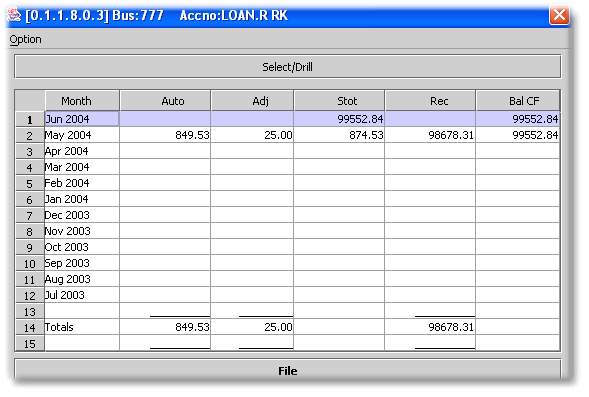
And 'Select/Drill' (F2) on a month for the transactions:
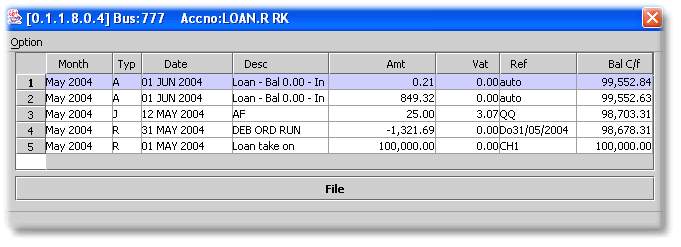
Or 'Select/Drill' on the Total line for a twenty four month transaction history.
Deb order - Only applicable to Loan debtors. Click on 'Sub enter' (F3) to enter bank and amount details if the instalments are to be collected via. debit order. The system amount is the amount that is required to be paid in terms of the original loan schedule. A higher amount may be entered in the Over ride amount, which will be charged to the debtor if captured. Refer to Sundry Receipt Batch (Contract/Loan) for more information on processing debit orders. The system amount can be automatically updated to adjust to interest rate changes and advanced capital payments - Refer to Review/Update Loan Debit Order
Fee Structure - Click on 'Sub Enter' (F3) to capture details of fixed amounts that will be billed to debtors. These are usually amounts in terms of a contract with the debtor. Future amounts can also be captured with the relevant dates captured in the entry screen, an example of which is displayed below:
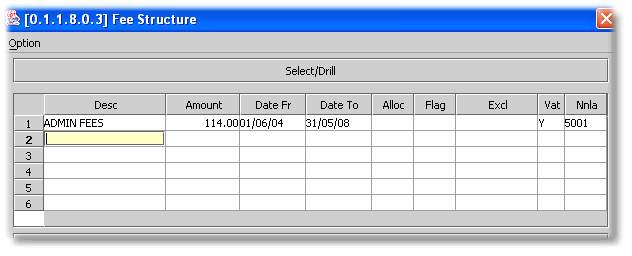
The amounts above will be raised as a Sundry Journal when Raise Monthly Fees (Contract/Loan) is run
Trade Disc, Settlement Disc, Stop Supply, Credit Limit, Sort, Credit control and Deliv can be ignored in the property system environment.
Vat Reg No - Enter the clients VAT number which will be printed on the invoices for the client.