This screen is used to capture any receipt from a Contract or Loan debtor. It is also used to process Loan take on's and debt orders. As this is a Balance Brought Forward system, receipts are not allocated against invoices/adjustments.
The line date of transactions is important for Loan debtors, as that is the date from which interest is calculated.
The following is an example of the receipt screen:
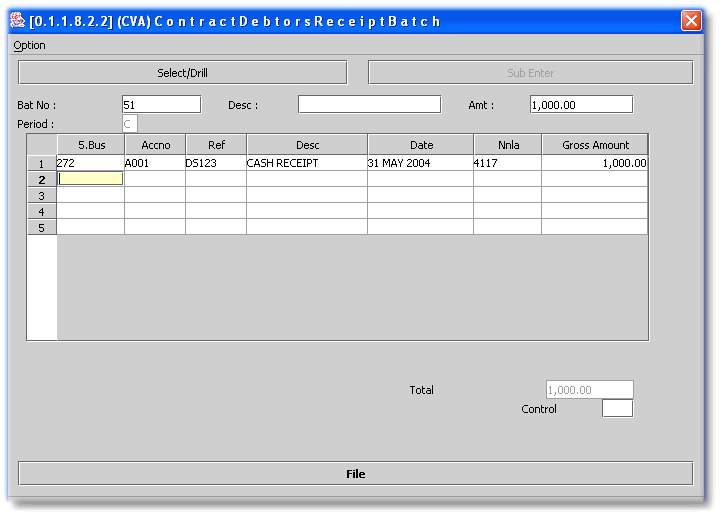
Batch No - Type 'NEW' or an unposted batch number. Refer to the notes on Debit Orders and Loan takeons below.
Desc - Type in a default description which will copy to each new line of the batch. Can be left blank.
Amt - Enter the total amount of the batch to be captured.
Period - Will always be the 'C'ash period.
Business No - Enter the Business Number or click on 'Select/Drill' (F2) to select off a list.
Acc No - Enter the Debtors Account Number or click on 'Select/Drill' (F2) to select off a list.
Ref - Enter the reference that will be used for bank reconciliation purposes.
Desc - Accept the default or enter a line description as required.
Date - Enter the receipt date. Remember that interest will be calculated using this date in a loan debtors case.
Nnla - This is the cash book account, and will default to the business default as set up.
Gross Amount - Enter the amount of the receipt for the debtor.
When complete, click on 'File' and post the batch.
Additional facilities for Loan debtors are as follows:
l Initial loan take on.
Once a loan, or many loans have been taken on, by typing 'LOAN.TAKEON' in the batch number field, a negative value Sundry Receipt batch will be produced by the system. The date, cash book reference and amount is based on the information captured when the Loan debtor was set up using Debtors Master File (Contract/Loan).
An example of the selection screen and a batch created by the system are displayed below. The Nnla is the cash book from which the advance to the debtor was made. It will default to the cash book used when the business was setup.


l Debit orders
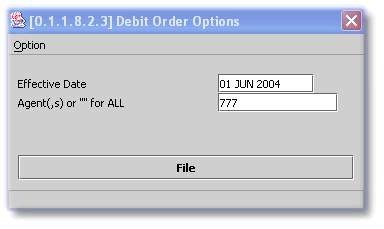
By typing 'DEBORD' in the batch number field, the system will scan the loan debtors of the selected Agent/Businesses, and produce an unposted Sundry Receipt Batch, which can be exported and uploaded to your bank. The amounts used will be the system instalment, or override amount (if it is higher), as per the original loan schedule and debit order field in Debtors Master File (Contract/Loan). An example of the election screen is displayed below: