This screen is used to capture payments to creditors or automatically produce unposted creditors payment batches, for cheque and electronic payment creditors.
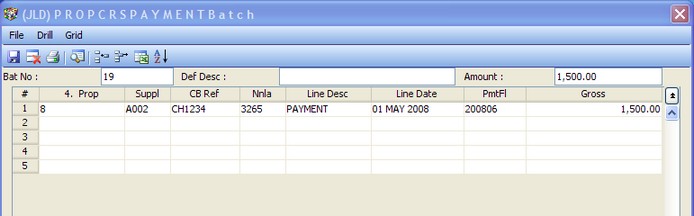
Use this screen to -
1. Capture manual payments that have been made to one or more creditors.
2. Run REMITC, REMITCW, REMITE or REMITEW to scan all outstanding creditors, and build an unposted batch to pay them, if they are due at that point, and if there are funds available in the property to pay them. REMITEW and REMITCW will only select creditors that are flagged as weekly paid creditors, whereas REMITE and REMITC will scan both weekly and monthly creditors.
1. Capture manual payments -
Enter 'NEW' for the next available batch number, or a previously unposted batch number in the Batch number field. Complete the remaining fields as required by the screen, noting the following:
1.1 Press 'F2' on the supplier column to pick off an alphabetical list of suppliers.
1.2 The CB Ref - Cash Book reference - field should be the cheque number, or other considered reference, as it will be used to reconcile the cashbook to the bank statement.
2. Run automatic payment batches.
2.1 Enter 'REMITC' or 'REMITCW' in the batch number field (1), and follow the prompts, to build an unposted batch of all payments currently due to creditors, who are not flagged as electronic payment creditors, for properties to which you have access, that have funds available to pay. To see a preview of this run, including which creditors have not been paid due to insufficient funds being available, run Creditors - Preview Payments. Once posted, you can print the actual cheques from under the Property Cash Book Menu. You will note that one cheque number is used for each line of the batch where the same creditor is paid for many properties.
2.2 Enter 'REMITE' or REMITEW' in the batch number field (1), and follow the prompts to build an unposted batch of all payments currently due to creditors, who are flagged as electronic payment creditors, for properties to which you have access, that have funds available to pay. To see a preview of this run, including which creditors have not been paid due to insufficient funds being available, run Creditors - Preview Payments. To flag a creditor so that they will be paid electronically, simply enter the bank details of the creditor in field 12 of Maintenance - Creditor and enter the creditors fax number if you want the remittance to be faxed automatically when you run Creditors - Send Remittance Advices