This option produces a report reflecting either the amount of a Property's share of the Central Bank Account, or the amount due by it to the Central Bank Account. The actual balance is adjusted by the amount owing to any creditors, or any VAT that must be paid on behalf of the Property, thus reflecting the Net Amount Due to, or by, a Property Owner. These adjustments can be included or excluded depending on the control flag setup for a Property (see below).
If run in Summarised Mode the report displays a single line containing the totals for each selected Property. This can be used both as a summary of the Central Bank Account, and to manage amounts due to the Central Bank Account.
You can choose to display either a single Net Total Line for a Group of Properties, or otherwise show them independently, by choosing 'Y' or 'N' when prompted.
(Refer to How do I Group Properties)
If the report is run from the Management Level, all system defaults are accepted on exiting, and you have not chosen to summarise group properties, you will then be offered the option of building payment batches to pay the displayed surpluses to Property Owners. This process produces a report that summarises its own processing, any unpaid amounts, and that lists all the relevant batches created by it. These batches are, by default, unposted, and can be edited before posting.
Whether Properties are included in the report or not, is dependent on the Payment Flag setting selected by the User.
(see below). Refer to How do I Pay surpluses to Owners
This report can also be run from the Owner Tenant Reporting Menu , but does not then offer the facility to build payment batches.
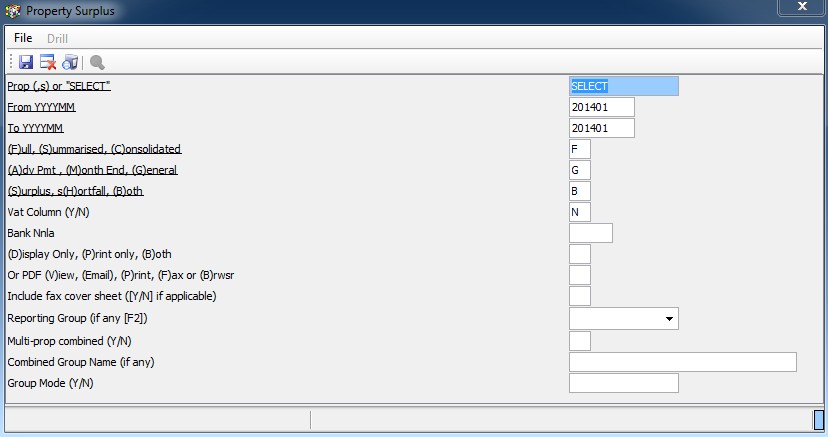
The insert shown above contains the options that must be specified when running this report:
Prop - Enter the Property Name or enter 'SELECT' to choose from a list of Properties.
Period - Enter the Year and the Month. This report is only available for a rolling, twelve-month period and should thus be printed and filed for each Property on a monthly basis. Similar information for periods prior to this rolling, twelve-month period can be obtained by analysing General Ledger Account 3265.
Full or Summarised - A Full Report separately displays all the details for the relevant month, per Property. A Summarised report lists only a single line per Property, which displays the balance and adjustments for totals, with totals per report. If you choose to Summarise Grouped Properties, only one line, with a Net Balance, will be displayed for the entire group.
Advance, Monthly or General - Insert 'A', 'M' or 'G' to select Properties according to their payment flags. This is used mainly to select Properties in order to pay over any surplus due to them.
e.g. To create a report that shows only 'Advance' Properties - i.e. those Properties that must be paid as soon as the Tenant pays the rental - run the Surplus Report and set the Payment Flag to 'A'. This creates the desired report from which the relevant payment batches can later be built.
These flags are set up in Field 24 of Maintain/Setup Property.
Surplus, Shortfall or Both - Enter the indicated letter (S, H or B) as required to display only the desired type of balances. Shortfall balances are those due to the Central Bank Account.
VAT Column Y/N - In a Full Report, a column showing the VAT content of the amounts paid or received as direct payments or receipts can be displayed. The default value for this field is 'Y' - i.e. the VAT column is displayed by default. Payments to Creditors, where the initial entry was not a direct Cash Book payment, do not display the VAT content. Full VAT details can be obtained from the Property VAT Report.
The final shortfall or surplus on the full report is automatically adjusted according to any creditors due by the Property, as well as any VAT due by the Property. These adjustments can be excluded, either globally or individually, by setting the relevant control flag in Maintain/Setup Property. If the flag is set to 'V', the VAT Control Balance is excluded. If it is set to 'C', the Creditors Control Balance is excluded. If set to 'VC', both balances are excluded. If this field is left blank, both balances are deducted.
An example of where such a change is necessary, is where the Property Owner pays his own VAT to the Receiver of Revenue.