This program displays or prints a columnar report in a trial balance format, for a selected Property or combined Group of Properties, showing multiple, selected properties alongside each other. Each column shows either the Year To Date or Month To Date value, as specified.
On running this program, the following display window appears: -

| 1. | Enter a single Property Number, or multiple Property Numbers separated by commas. Alternatively, enter ' SELECT' to pick from a list. |
| 2 and 3. | Enter the required Date. This report is available for a rolling twelve-month period. Use the Multi-Month Columnar Report and Group Properties as required for earlier periods. |
| 4. | Enter 'Y' for Year To Date figures, or 'M' for Month To Date figures for the selected month. |
| 5. | Enter a Group Name that describes the selected group as you require. |
The report displayed is similar to the following, in which Year To Date was selected: -

If 'F2' is pressed while the cursor is on a Total YTD column item, a twelve-month summary for the group will be displayed, as follows: -

If 'F2' is pressed on any particular month, a breakdown of the total moves per Property within the selected group is displayed. In the above example, 'F2' was pressed while on Nov 2001, thus displaying the following and breaking down the total move of R -18,680-00: -

By pressing 'F2' on one of the Properties, a full transaction listing, making up the move for the selected month, will be displayed, as follows: -
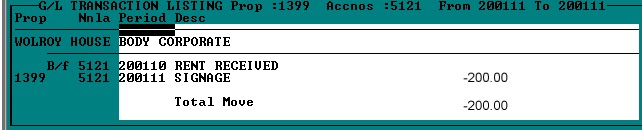
Full information regarding the batch number, type etc. can be viewed by scrolling to the right.
When 'F2' is pressed on an individual property's column in the displayed report, as opposed to the total column, as shown above, a twelve-month history of the account for that Property is displayed as follows: -

If 'F2' is pressed on any month, a full transaction listing is displayed, as in the example shown above.