This program displays or prints a columnar report, in a trial balance format, for a selected Property or combined Group of Properties, showing multiple, selected months alongside each other. Each month's column display either the Year To Date or Month To Date value, as specified.
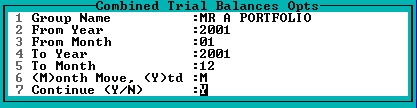
When you run this program, the following window will be displayed: -

If a single Property is selected, the resulting month's columns will be for that single Property. If a Group of Properties is selected, then each column contains the total for the relevant account for the group .
The drills described below work directly into the transactions spoken of immediately above. When a group is selected, the first drill displays a table showing the totals per member of the group. Drilling into any of these totals displays the transactions making up the total for that Property. A drill on the group total in the display window, lists transactions for all Properties that make up the total.
Once the Group or Property has been selected, the following window must be completed: -
The resultant report will be similar to the following: -
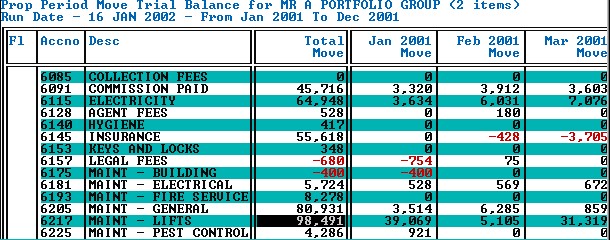
By drilling (Pressing 'F2') on the Total column of Account Number 6217, the following breakdown of the R 98,491 is displayed: -
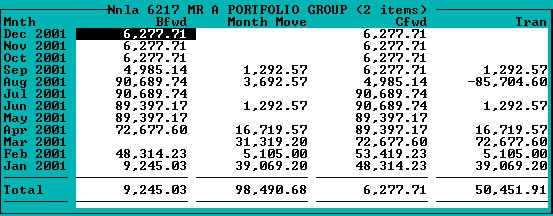
Further drilling on the move for August 2001, displays the totals per Property within the group that make up the total move, as follows: -

A further drill on any single Property or on the Total line displays the relevant transactions.