This program prints or displays a Full Transaction Listing for an Agent/Business for a selected period. If the selected period extends from the beginning of a financial year, then the income and expense accounts will begin with a zero balance so as to reflect a normal accounting position.
When this program is run, the following window is displayed:
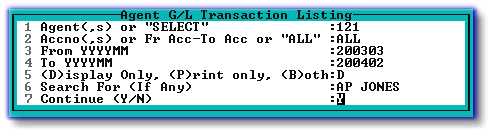
| 1. | Enter an Agent/Business Number, or enter multiple numbers separated by comma's. Alternatively, enter 'SELECT' to pick from a list of Agent Numbers. If more than one Agent/Business is selected, they will not be consolidated, but will rather be displayed sequentially. |
| 2. | Enter 'ALL' for a full listing of Account Numbers, or list the required Accounts separated by commas. |
| 3 & 4. | Enter the required Period within the previous three-year period. Additional Period history can be obtained in a different format by using Detailed Transaction Listing per Franchisee (Agent) per Period. |
| 5. | Choose the relevant option. |
| 6. | Enter any text that appears in the transaction detail line, and for which you wish to search. e.g. if you are looking for any/all transactions whose description line contains the phrase 'MANAGEMENT FEES', enter 'MANAGEMENT FEES' or 'MANAGEMENT' etc. in this field. This line can be left blank. |
The report will look similar to the following:
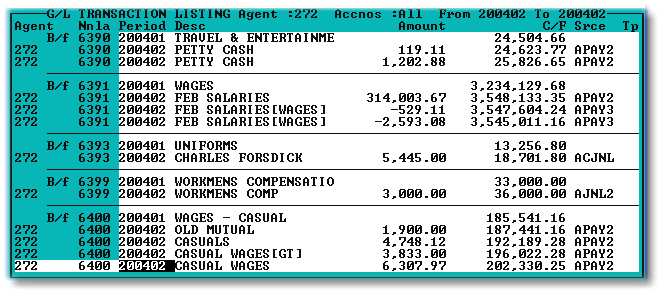
Batch numbers, etc., are displayed, and can be viewed by scrolling to the right. Batch details can be used by running Batch Enquiry on the Agent/Business level