This report assists with the completion of monthly or bi-monthly VAT returns to SARS for the selected Agent/Business or group of Agents/Businesses. It provides an analysis of general ledger account 3272 for the selected period/s and is available in either a fully detailed or in a summarised version.
The (F)ull Version details all transactions, separated into Output VAT and Input VAT categories, with subtotals per category, and a Net Total at the end of the report. The split between the two categories is based on the type of batch that gave rise to the entry. e.g. A payment batch will default to Input VAT.
The report is based on the VAT amounts, and the original figures on which the VAT amounts are based are extended from them. There might therefore be some small rounding differences in the gross amounts.
An example of the selection screen is displayed below:
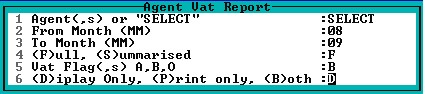
The report displays data from the period or periods selected and is available for a rolling twelve-month period. Reports should be printed and filed as backup documentation to the VAT returns.
If the (S)ummary Verson is chosen, only the totals for selected Agents/Businesses will be displayed. Any Manual Journals to the VAT Control Account are noted in the report. This is aimed at assisting in the bulk completion of VAT returns, with system generated entries receiving less scrutiny than any manual entries.
Note:
When dealing with Agents/Businesses whose VAT Control Account has been linked to a controlling Agent/Business, remember that the VAT entries will be posted in the controlling Agent/Business.