Use this screen to produce a general type invoice to a customer, for goods or services supplied. It can be use to produce a multi lined invoice to one debtor of one business. The entry will be posted to 4168, Debtors control, and to the relevant income account.
The following is an example of the Sundry invoice screen:
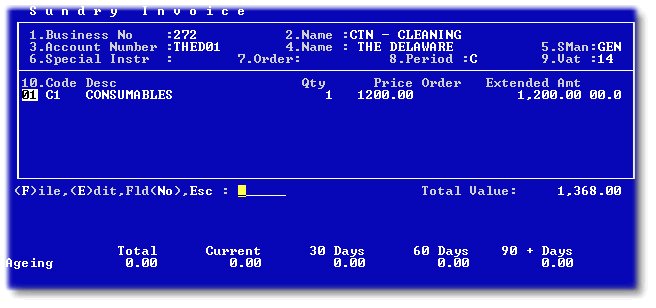
1 and 2 - Enter the relevant business number from which you wish to invoice.
3 and 4 - Enter the Debtors number whom you wish to invoice or press 'F2' to search all debtors linked to the selected business.
5 - The salesperson setup on debtors masterfile will be the default value, but can be changed to any salesperson.
6 and 7 - not generally used in the property environment.
8 - Only the Cash or Current period is available in the sundry invoice screen. This is the period into which this transaction will be posted. The Billing or next period is also available in the Standard Journal batch.
9 - This will be the VAT rate selected in the debtors masterfile for this debtor.
10 - Enter the invoice details as per the screen requirements:
10.1 - The Code is any Invoice code as setup in the Setup Menu, Invoice Codes. The default description will be displayed, but can be changed. The income will be posted to the general ledger code setup in the setup menu.
10.2 - Enter the line amounts EXCLUDING VAT. The system will add the VAT.
When all lines are completed, press '.', and 'F' to file the invoice. The invoice will either print or be e-mailed ( if an e-mail address is entered on contact information). The system generated invoice number will be displayed after printing,which will be prefaced by a capital I, followed by a unique number, eg: I21222
The debtors balance (prior to the present invoice) and ageing will be displayed at the bottom of the screen for reference purposes.