Overview:
The aim of the bank charge recovery system is to provide a property manager with the ability to recover the bank charges it incurs due to its clients use of its bank account to process their transactions. It would be relevant therefore in a central banking, or agent central banking environment. Properties that use their own bank accounts within a central banking environment would need to be setup not to charge.
The recovery process is integrated into the normal transaction capturing screens, giving charging options to the capturer where a decision is required, or charging automatically based on the set up rules.
It recovers several different types of charges, as can be seen in the setup tables below. It allows for a central default charging table, with a per property (owner) over ride table to charge different rates or not at all. The various charges can be individuality activated or blocked.
Setup:
Overview:
The default central charges are set up in two tables:
1. Other bank charge table which covers all charges except cheques issued.
2. Cheque charge table, with a base charge, a % of value and a maximum charge
3. All values in the tables are exclusive of VAT. The system will add VAT to the charges setup in the tables.
1. A screenshot of the general setup table, indicating its menu position, follows:
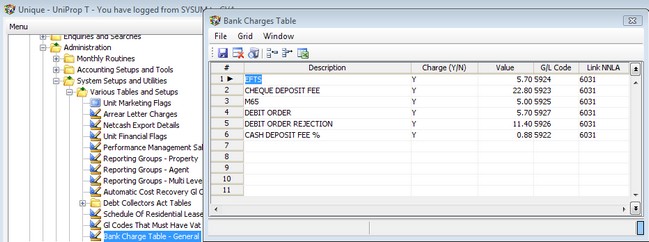
The position of these charges in the table needs to remain unchanged. You can set any charge to 'N', which will deactivate that charge completely. You can set the various rates and general ledger codes to which the recovery will be posted. The link NNLA is the property level general ledger code and is only displayed here.
The rates setup in this table will be used in charging properties, unless the property has it's own override structure, as shown below.
2. A screen shot of the central cheque issued charge table is displayed below, indicating its menu position:

The rates setup in this table will be used in charging properties, unless the property has it's own override structure, as shown below
There is an agent based override cheque charging table as indicated in the following screenshot:
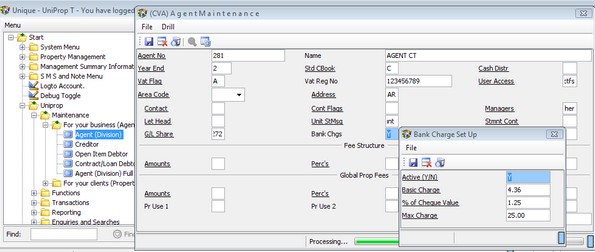
All properties linked to the relevant agent will use these values in preference to the central rates setup above.
The ability to setup different rates for an individual property is contained in the Property Maintenance screen, as indicated below:
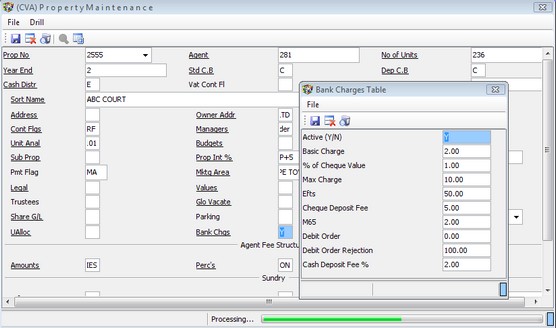
Rates setup here will be used in preference to the central values. Setting a value here where the charge has not been activated centrally, will not override the central blocking of the charge.
If a zero is entered on any line, no charge will be raised for the relevant charge for the property.
Operational information and rules
Based on the setup above, the various charges will be raised as follows:
1. Cheque and EFTS charges
Cheque payments and EFTS payments are captured using Property Sundry Payment Batches and Property Creditor Payment batches. These two screens will charge cheque or EFTS charges based on the cash book references used according to the following rules:
- The total of each reference, per property, will be used as the base to calculate the charge to the property.
- An Agent to Property Adjustment batch will be produced and posted by the system automatically on the posting of the batch.
- EFTS charges will be charged if the cash book reference starts with 'Efts.', else a cheque charge will be calculated.
For example, if a cheque payment to a city council is captured, over several lines based on the general ledger allocation, but using the same cash book reference, the system will add up all the lines and charge one bank charge based on the table.
2. M65 and Debit Order charges
These charges originate from receipts from units via the debit order system, and using the M65 deposit slip at Standard Bank (or other bank equivalent).
If the batch was generated from an M65 import, the cash book reference will start with 'Mr', the system will count the number of units in the batch for each property and charge one charge to the property being the number of units multiplied by the per transaction fee for M65's.
If the batch was generated from the DEBORD command, the cash book reference will start with 'Do', the system will charge each unit.
The system created batches for debit orders and M65's use the above references and the batches need to be posted from the standard unit Receipt Batch screen.
3. Cash and Cheque Deposit fees
These charges are generated from the specialised unit receipt screen:

Entering a flag in the BC Flag field will raise a charge to the units as follows:
- N, to not charge
- C, to charge a cash deposit fee or
- Q, to charge a cheque deposit fee.
4. Debit Order rejection fees
Entering a Y in the Unit Refund Batch screen in the RDF field, will charge the RD fee to the relevant unit:

Reporting
The various bank charges raised to properties will be summarised to one line in the disbursement statement and in the owner statement.
A specialised bank charge report is available. It can be run in detail or summarised forms. It extracts all system generated bank charges posted to GL code 6031.
