This report displays a listing of Tenant's Deposits held by a Property on behalf of its Tenants. The report contains details of all transactions relating to each Tenant's deposit, and specifies the bank account in which it is held.
Refer to the notes below the example selection window for more information on the report options:
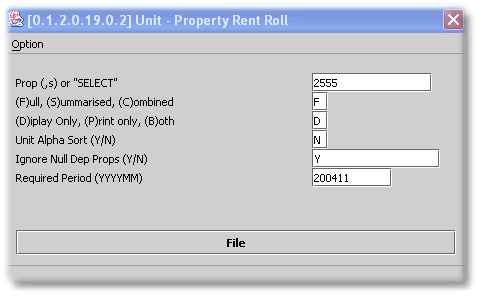
| F, S or C - | A Full Report displays data per Property and is made up of all transactions to date, for each deposit. A Summarised Report also displays data per Property, but contains only a single line per deposit, which contains the Totals for each section for that deposit. A Combined Report only displays the Total of all deposits for a single Property. However, multiple Properties, each on a separate line, can be displayed in a single report. |
| Unit Alpha sort - | Set this flag to 'Y' in order to change the Default Account Number Sort Order from Numeric to Alphabetic (by name). |
Ignore Null Deposit Properties - When running a full 'C'ombined List, it is often useful to exclude Properties without Tenant Deposits. Setting this flag to 'Y' achieves this end. A Full Report displays all Properties, and is used to balance back to your Deposit Trust Account for audit purposes.
| Required period - | This report can be run for an historical period of 3 years. |