This program prints or displays a full transaction listing for a Property, for a selected period. If the selected period coincides with the beginning of a financial year, then the income and expense accounts will begin with a zero balance, to reflect a normal accounting position.
When this program is run, the following window will be displayed: -
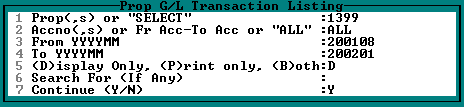
| 1. | Enter a Property Number, or a multiple Property Numbers separated by commas. Alternatively, enter 'SELECT' to pick from a list. Multiple Properties will not be consolidated, but rather displayed individually. |
| 2. | Enter 'ALL' for a full listing, or enter the required accounts separated by commas. |
| 3 and 4. | Enter the required period within the available 3-year period. Further history can be obtained in a different format by using Transaction listing per Property per Period |
| 5. | Choose the relevant option. |
| 6. | Enter any text contained in the transaction detail line, for which you wish to search. e.g. If you are looking for all transactions whose description line contains 'MANAGEMENT FEES', enter 'MANAGEMENT FEES' or 'MANAGEMENT' etc. in this field. This line can be left blank. |
The report displayed will be similar to the following: -
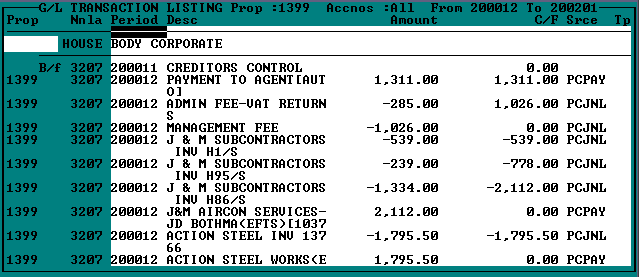
Batch numbers etc. are displayed, and can be viewed by scrolling to the right. Full batch information can be viewed by running Batch Enquiry on the Property Level.