This program displays or prints an age analysis of outstanding debtors based on the line date of each outstanding transaction. This report might not balance back to the balance on the debtors control account, due to the inclusion or exclusion of transactions based on their line date, and not the financial period into which the entry was posted. The Debtors Balance Report will produce a list of debtors that will balance to the debtors control account.
The following is an example of the selection screen:
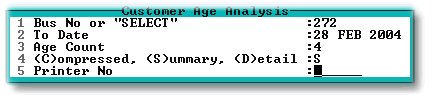
1. Enter the relevant business number or enter 'SELECT' to choose from a list of businesses. If you select more than one business, a 'F'ull or 'S'ummary report will be displayed for each selected business, one after the other. A 'C'ombined report will show a total line only on one report for each selected business.
2. Enter the date to which you wish the report to run.
3. Enter the number of periods you wish to show in the report, going backwards from the 'To date'. This value must be 4 and 12 months.
4. A 'D'etail report adds a line with the contact information for the debtor to each debtor displayed in a 'S'ummary report. A 'C'ombined report will show a total line only for each selected business, on one report.
5. Enter a printer number to print, or leave blank to display the report.