Menu: Maintenance, For your clients, Maintenance - Unit, Debit Order (Field 13)
Unit debit orders relate to amounts due by a unit occupant to the property that they occupy and to the agent that manages the property. The amount due referred to below is an accumulation of these two amounts. Any amount restriction imposed will result in an allocation between the property and the agent based on the allocation rules of the account ie. first agent, then property (default) or vice versa.
Debit orders can be setup on any unit and will be included in the debit order runs, but will only be included in the export file to the bank if the property is part of the central banking system. A property that uses it's own local bank account, would have to do a separate run for itself, which is probably uneconomic.
Enter the following information to setup a debit order information:
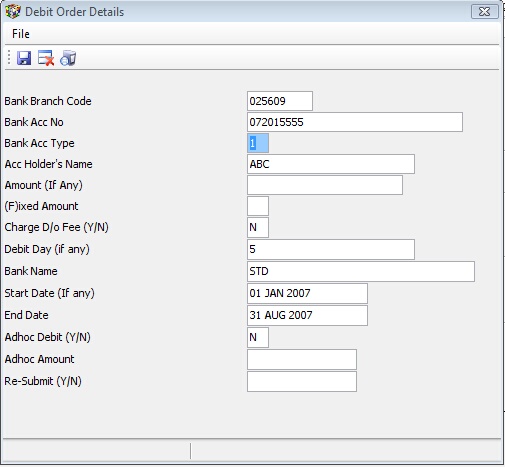
Bank Branch Code |
Enter a maximum of 6 numeric characters, which represent the branch code assigned by the relevant bank. |
Bank Acc. No |
Enter the bank account number to be debited |
Bank Acc. Type |
Enter '1' for current account, '2' for savings account, '3' for transmission account. |
Name |
Enter the name of the account holder |
Amount (if any) |
Enter a maximum amount. If no amount is entered, the balance due by the unit will be raised. If an amount is entered, the balance up to the entered amount will be raised |
Fixed amount |
Enter an 'F' if the amount entered above is to be raised irrespective of any balance due by the unit. If an amount is entered, and 'F' set, then the amount will be raised even if there is no amount due by the unit. |
Charge D/O fee |
If the unit's property is part of central banking, then a bank charge recovery will be added to the amount debited to the relevant bank account, unless this flag is set to 'N'. The default is 'Y' and requires a password to be changed. This fee is receipted as a batch on the central bank account, and is not recorded on the unit. |
Debit day if any |
the date in a month that the debit order should be run on. A blank field will default to the 1st. |
Bank name |
A record of the name of the clients bank. |
Start date and End date |
The unit will only be included if the run date is within any entered date range |
Adhoc Debit Flag and amount |
set the flag to 'Y' and insert and amount that will be picked up when running the adhoc debit orders. |
Re-submit flag |
set to 'Y' to include the unit in the next debit order run, even if the debit day is not applicable. This is usually used when a debit order has been returned, and the clients asks that you rerun the debit order. |
The unit will be included when a debit order run is performed, if the above information is entered. Refer to How do I Run and process Debit Orders for more information.