Use this option to view the bank reconciliation for either the Central Bank Account or the Management Level Local Bank Account. This report displays a comparison of the transaction record for the relevant bank accounts as recorded in the Cash Book (Gl) and the Bank's (Bs). Use of this facility requires a basic understanding and ability to perform a standard bank account reconciliation. The process and options are described in the examples shown below:
An example of the initial screen:
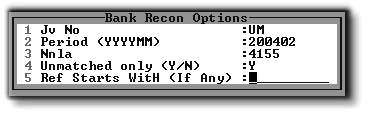
1.The JV number is usually 'UM', as in the example above.
2.The Period is the period for comparison that you select at the time of running the report.
3.The Nnla is the bank account for which the reconciliation is being viewed. 4155 is the Central Bank Account, and 4117 is the Management Local Bank Account.
4.You can view either only the unmatched transactions 'Y', or all of the bank account transactions for the selected period 'N'.
5.You can either select only certain References by typing the first few characters of the reference, or alternatively leave this field blank to select all references. This selection is usually used for lookup purposes in order to match specific references.
The following shows an example of the report. The first of the next two images is an extract from the body of the report, and the second shows the report footer with the totals:
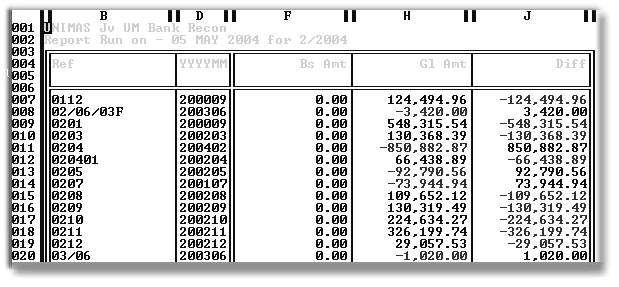
| Ref - | The Reference used when capturing the Cash Book entry, or when capturing an unmatched bank statement entry. |
| YYYYMM - | The period in which the entry was captured. |
| Bs Amt - | The amount, as per the bank statement. |
| Gl Amt - | The amount, as per the Cash Book or General Ledger. |
| Diff - | Any difference between the Bs and the Gl amount. If this is zero, the reference is considered to be matched. |
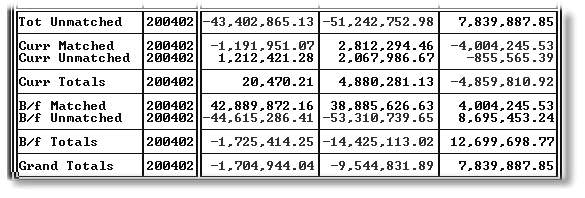
The above graphic shows an example of the Totals Block of the Bank Reconciliation Report. It analyses the matched/unmatched totals, and arrives at the Grand Totals, which represent the balance as per the Bank Statement, as per the Cash Book, as well as the difference between them. The Total Difference is made up of the list of differences in the difference column.
It is obviously important not only to reconcile the differences, but also to check that the Bank Statement Column Grand Total agrees with the actual Bank Statement. If these two statements are balanced, you can be reasonably certain that you need only work with the differences in order to pick up any errors.
Some useful tools for matching items and tracing their source are built into the report display. If you click on 'Select/Drill', or press 'F2' while your cursor is on a particular line, the batch or batches that make up that reference are be displayed. In the following example, we drilled on Reference 'DS1954' and found that it originated in Unit Receipt Batch 62950, as can be seen in the graphic below:

We then drilled on the Batch Line, which brought up the full detail of the batch, as can be seen below. This drill also specifies that the batch was captured by user 'A' on 6th Oct 2000.

We referred above to selecting Unmatched only, 'N', for a full listing. After selecting 'N', as in the example below, you will be asked for the target month:
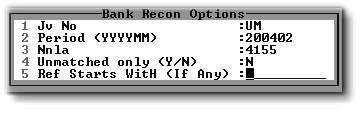

The report thus produced includes all bank statement entries for the selected month. The volumes involved in a full listing of both accounts for a full month are often too large. The unmatched only 'N' listing is usually used to trace bank statement errors, hence the path that we have chosen.